 XHLUX
XHLUX
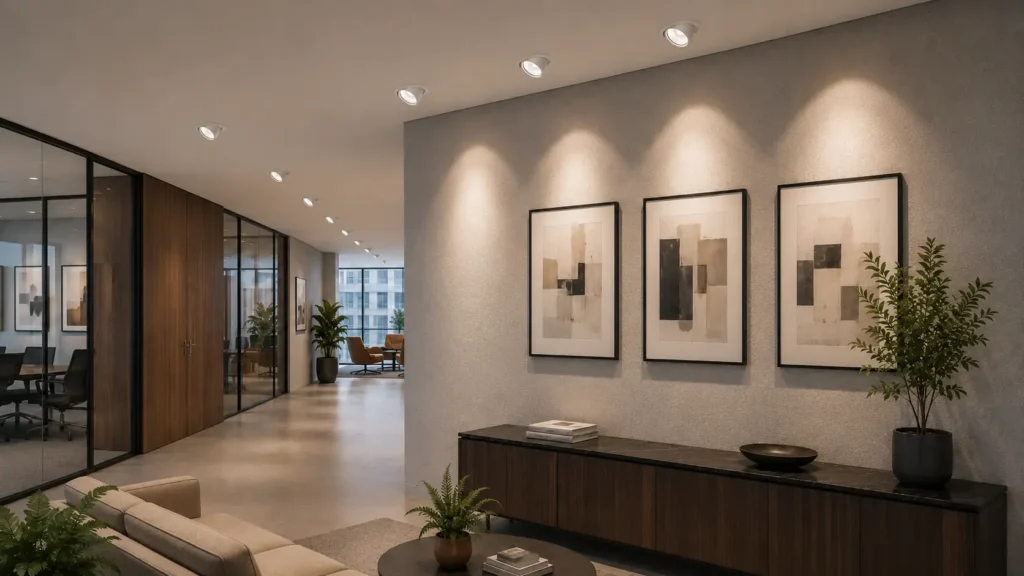
A directional downlight aims its beam where the target sits — a wall, display, or work surface — not only straight down.
It is the same family as gimbal / tiltable / adjustable recessed spots.
This page is for specifiers who already know they need aiming.
It covers accent vs task use, beam and tilt together, glare, and what to verify before order.
For the binary fixed vs adjustable type choice, use the comparison guide linked below.
Key Takeaways
– Directional = aimable optic (tilt + rotate); fixed = nadir only.
– Specify tilt range, beam angle, and fixture-to-target distance as one set — not as three separate catalogue picks.
– Accent needs higher contrast and usually narrower beams; task needs usable lux with glare control.
– Recessed gimbals need more void depth than same-aperture fixed models — measure before you buy.
1. What a Directional Downlight Is
A directional downlight puts a gimbal, ball-joint, or tilt ring in the housing.
After install, you can tilt the optic off vertical and rotate it toward the target.
Typical commercial sheets quote about 15–35° tilt and up to 355–360° rotation — always read the model.
Formats:
- Recessed gimbal — mechanism in the void; cleaner ceiling plane
- Surface tiltable — mechanism below the soffit when void is limited
“Directional” here means aim.
It does not mean CCT switchable or multi-watt selectable.
🎯 How does a directional head differ from fixed?
Fixed locks the beam straight down; directional tilts and rotates so light can hit walls, displays, or desks off-centre.
2. Accent vs Task — Different Jobs
| Job | Goal | Typical beam habit | Watch-outs |
|---|---|---|---|
| Accent | Contrast on merchandise, art, features | Narrow–medium | Colour (CRI), hot spots, aim lock |
| Task | Usable light on work plane | Medium more often | Glare into eyes, EN 12464-1 UGR limits |
| Wall wash | Even vertical luminance | Medium–wide + consistent setback | Spacing vs setback; scalloping |
Do not force one beam and one tilt for every zone.
Map accent rows and task points separately on the reflected ceiling plan.
🎯 How do accent and task differ?
Accent builds contrast on a feature; task needs usable desk lux with glare control, so beam and shielding choices diverge.
3. Beam Choice for Accent, Task, and Wash
This section picks beam class by scene.
The physics of how tilt changes throw, oval pool shape, and on-target lux is covered in the tilt-angle performance guide — use that page for tilt mechanics; use this page for accent vs task vs wash application.
| Beam class | Typical angle band | Best for on this page |
|---|---|---|
| Narrow | ~15–24° | Single SKU, small art, tight accents |
| Medium | ~25–38° | Tables, shelf runs, feature panels |
| Wide | ~40–60° | Broader wash / larger vertical surfaces |
These three classes grade accent / gimbal optics on this page. They are not the same “wide / narrow” labels used for ambient-downlight vs spotlight family splits on the downlight-vs-spotlight terminology guide.
Fixture-to-target distance still changes pool size.
Check the supplier beam diagram or IES file before locking counts.
For slopes and max-tilt budgets, follow the tilt guide checklist, then return here for glare and CRI.
🎯 Why start with beam class on this page?
Because accent, task, and wash need different pool sizes — tilt mechanics stay on the tilt performance article.
4. Glare and Comfort
Aiming toward a seated viewer can put the LED in the field of view.
Mitigations common on commercial gimbals:
- Deeper recessed source position
- Snoot / baffle / honeycomb accessories
- Lower lumen package on accent heads near sight lines
For offices, check project UGR targets (often UGR < 19 under EN 12464-1 for many desk areas) — confirm with the lighting design, not a packaging claim alone.
🎯 How do you keep directional light comfortable?
Shield the source from viewing angles with deep set or baffles, lower output near sight lines, and check the project UGR target.
5. CRI and CCT for Accent and Task
Retail colour-critical accent: plan CRI ≥ 90 as a common minimum; galleries often ask higher.
Fresh food and cosmetics are sensitive to weak CRI — muddy colour kills perceived quality.
CCT follows the space brief:
- Hospitality / residential-feel retail — often warmer (e.g. ~2700–3000 K)
- Many offices / general commercial interiors — often ~4000 K
Match accent CCT to ambient unless the design intentionally contrasts.
🎯 What CRI should accent displays use?
Plan CRI 90 or above for colour-critical retail accent; confirm gallery or food briefs if they specify higher.
6. Ceiling Format Still Gates the Housing
Directional optics do not cancel void limits.
Recessed gimbals usually run deeper than fixed housings with the same aperture.
If the void fails the datasheet minimum, switch to surface tiltable — or redesign the void.
Fire rating and IP still apply by zone.
Aimable does not mean “skip the fire strategy” or “skip wet-zone IP”.
🎯 Does aiming change the ceiling rules?
No — void depth, fire strategy, and IP still gate the housing; directional only adds tilt and depth demand.
7. Verification Before You Order
| Check | Pass | Common fail |
|---|---|---|
| Aim geometry | Tilt + beam + distance reach the target | Ordering beam only from a mood image |
| Void depth | Datasheet min ≤ measured min (3 points) | Assuming gimbal fits like fixed |
| Glare | Shielding matches viewing angles / UGR brief | Aiming bright apertures into faces |
| CRI / CCT | Matches accent or task brief | One CCT forced across unlike zones |
| Mixed layout | Fixed ambient + directional accent mapped | All-directional grids used as ambient |
| Hold / lock | Aim holds on slope or after vibration | Heads droop on pitched soffits |
🎯 What should you verify first on directional?
Confirm the aiming package (tilt, beam, distance) and measured void — then glare, CRI, and lock behaviour.
8. Decision Checklist
- Mark zones: accent, task, wash, or ambient-only.
- Ambient-only → prefer fixed (see adjustable vs fixed guide).
- Accent / task / wash → directional; note target size and setback.
- Pick beam class and tilt range together; check photometry.
- Measure void; reject recessed gimbals that fail depth.
- Set glare accessories / UGR expectations for task zones.
- Lock CRI, CCT, lumens — then approve samples on a real target if colour-critical.
🎯 What order should you specify directional in?
Zone the job, choose directional only where aiming is needed, then pair beam with tilt and void before finishing CRI and CCT.
9. Manufacturer Fit (Soft)
A fit supplier publishes tilt, rotation, beam options, and recessed depth on the same sheet.
It offers matching fixed ambient and directional accent apertures.
It can support a mock-up aim on a wall or desk prototype.
XHLUX supplies commercial directional and fixed LED downlights.
That includes recessed gimbal and surface tiltable options where void is limited.
Treat every tilt and beam claim — including ours — as a datasheet and layout check.
What to Do Next
- LED downlight category — directional and fixed shortlist.
- Adjustable vs fixed — type choice before aiming detail.
- Tilt angle performance — how tilt changes throw, pool shape, and lux.
- Ceiling types guide — recessed vs surface by substrate.
- Contact — tilt, beam, and depth sheets against your RCP.
Frequently Asked Questions
Sources
- XHLUX. LED Downlight Product Catalogue and Technical Datasheets. https://www.xhlux.com/led-downlight-manufacturer/
- CEN. EN 12464-1 (Light and lighting — Lighting of work places — Indoor). https://www.cen.eu/
- IEC. IEC 60529 (IP Code). https://www.iec.ch/
Technical notes: Confirm tilt, beam photometry, void depth, fire rating, IP, and project UGR against the fixture sheet and lighting design. Use qualified electrical labour for mains work.
![What is Modular Dimmable Track Light: Best Guide [2025]](https://www.xhlux.com/wp-content/uploads/2025/06/High-Efficiency-Commercial-LED-Modular-Track-Light-Fixtures-560x560.webp "What is Modular Dimmable Track Light: Best Guide [2025]")