 XHLUX
XHLUX
For European workplace projects, EN 12464-1:2021 gives 500 lx maintained illuminance for conference and meeting rooms and conference tables.
This is a European workplace-lighting benchmark, not a universal requirement for every project or jurisdiction.
But reaching 500 lx on the conference table does not automatically mean the whole room is lit correctly. Faces, displays, walls and camera views need to be checked separately.
When you plan LED lights for conference room projects, this guide shows what to check beyond the table and how to measure it.
In breve: Treat 500 lx on the table as the EN 12464-1:2021 starting benchmark for European workplace projects. Then check faces, displays, walls and the live camera image. Zoom’s guidance adds about 20–30 fc (≈215–323 lx) on faces toward the camera, under 20 fc on displays and 10–15 fc on walls.
Sommario
- Conference room lighting at a glance
- Is 500 lux enough?
- Why horizontal illuminance is not the whole story
- What changes for video conferencing
- Why wall lighting changes perceived brightness
- Meeting modes and lighting balance
- Lux and lumens
- Fixture selection and layout
- Errori comuni
- How to measure in practice
- Specifications besides lux
- Summary
📋 Conference Room Lighting at a Glance
| Cosa controllare | Reference value | Source / measurement |
|---|---|---|
| Conference room | 500 lx | EN 12464-1:2021 |
| Conference table | 500 lx | EN 12464-1:2021 |
| Uniformità | Uo 0.60 | EN 12464-1:2021 |
| abbagliamento | RUGL 19 | EN 12464-1:2021 |
| Colour rendering | Ra 80 | EN 12464-1:2021 |
| Cylindrical illuminance | 150 lx | EN 12464-1:2021 |
| Wall illuminance | ≥150 lx | EN 12464-1:2021 |
| Ceiling illuminance | ≥100 lx | EN 12464-1:2021 |
| Face, toward camera | ≈215–323 lx | Zoom: 20–30 fc |
| TV/display | <215 lx | Zoom: <20 fc |
| Walls in camera view | ≈108–161 lx | Zoom: 10–15 fc |
The EN and Zoom values describe different measurement planes and purposes, so they should not be compared as if they were the same type of illuminance.
Zoom publishes its figures in foot-candles. The lux values above are rounded conversions (1 fc ≈ 10.76 lx).
💡 Is 500 Lux Enough for a Conference Room?
For European workplace projects where EN 12464-1 applies, 500 lx is the starting benchmark for conference and meeting rooms.
500 lx can be correct on the conference table while the room is still poorly lit for people or video.
That figure mainly answers one question: how much light reaches the horizontal task area.
On its own, it cannot tell you about:
- faces
- camera exposure
- display reflections
- luminosità della parete
- the brightness balance of the room
For example, a room could measure slightly above 500 lx on the table while participants’ faces remain poorly illuminated.
The same applies to boardroom lighting: a bright table is only the first check, not the final answer.
🎯 Does 500 lx on the table settle the question?
No. It sets the task-area benchmark, but faces, displays, walls and the camera image still need their own checks.
📐 Why Horizontal Illuminance Does Not Tell the Whole Story
Conference Tables Need Horizontal Light
Illuminance, measured in lux, is the amount of light arriving on a surface.
EN 12464-1:2021 Table 34 lists 500 lx for the conference table, where people read, write and share documents.
Where you measure matters. A reading on the table plane describes the table, not the people sitting at it.
People Need Light from More Than One Direction
The same table lists 150 lx cylindrical illuminance for conference and meeting rooms.
Horizontal illuminance mainly tells you whether light reaches the table.
Cylindrical illuminance tells you whether there is enough light around a person, arriving from several directions.
It relates to:
- facial modelling
- visual communication
- recognising people across the table
- how the space is perceived
A bright table does not necessarily mean a bright face.
🎯 Why track cylindrical illuminance at all?
It describes the light around people, which supports faces and visual communication that a table reading cannot show.
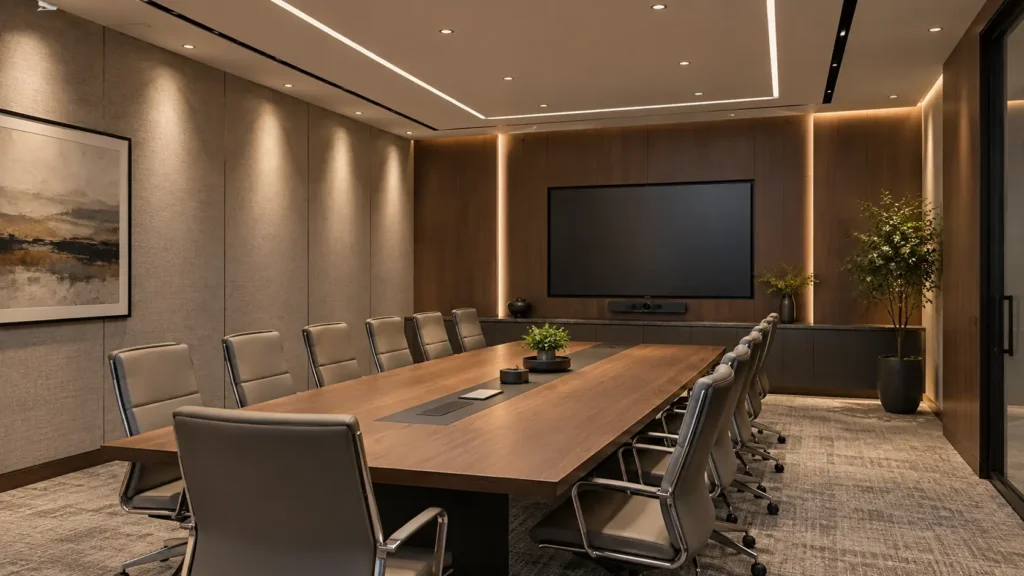
🎥 What Changes When the Room Is Used for Video Conferencing?
Workplace-lighting standards establish the room’s general lighting foundation; video-conferencing guidance adds camera-specific checks.
Video-call friendly lighting is about how faces, the background and the display relate to each other in the camera image.
Zoom’s Lighting Concepts guidance gives three illuminance references, measured in foot-candles.
Faces: About 215–323 Lux Toward the Camera
Zoom recommends 20–30 fc of vertical illuminance on faces, about 215–323 lx.
Measure at the face position in the seat, with the light meter facing toward the camera at the front of the room.
Displays: Keep Incident Light Below About 215 Lux
Zoom recommends less than 20 fc on TV displays, or less than about 215 lx.
Too much light falling on the screen can cause:
- reflections
- washed-out images
- reduced contrast
Walls: About 108–161 Lux Average
Zoom recommends 10–15 fc of average illuminance on walls, about 108–161 lx.
The aim is not the brightest possible wall.
It is a more balanced brightness relationship between the subject, the wall and the display in the camera image.
Technical note: ANSI/IES/AVIXA RP-38-17 (R2022) addresses small-to-medium single-axis videoconferencing rooms with 3–25 primary seating locations (IES).
🎯 Is the workplace benchmark enough for video calls?
Not on its own. Camera guidance adds face, display and wall checks on top of the room’s general lighting.
🧱 Why Wall Lighting Changes How Bright the Room Feels
Walls sit in the natural field of view, so the way they are lit shapes how bright the room feels.
ERCO’s wallwashing guidance notes that, at the same illuminance, a lit vertical surface gives a much stronger impression of brightness than a lit horizontal surface.
In offices, wallwashing also reduces the brightness contrast between luminous screens and their surroundings.
Light reflected from the walls is diffuse, which models faces more softly during discussions.
For example, two rooms can both measure 500 lx on the table, but the room with better-lit vertical surfaces may appear brighter.
🎯 Can two rooms at 500 lx feel different?
Yes. The room with better-lit walls and vertical surfaces can look brighter even when the table readings match.
🔄 Different Meeting Modes Need Different Lighting Balance
A conference room rarely does only one job.
| Mode | Main lighting concern |
|---|---|
| Discussion | Table visibility + faces |
| Video call | Faces + camera background + display |
| Presentation | Display visibility + controlled ambient light |
| Workshop / training | Even task lighting |
| Hybrid meeting | Balance table, faces, display and camera |
Dimming or scene control can help the same room adapt to different meeting modes.
🔢 Lux and Lumens Are Not the Same Thing
- Lux is the amount of light arriving on a surface.
- Lumens describe the total light output of a luminaire.
A luminaire’s lumen output alone cannot tell you whether the conference table will reach 500 lx.
The result also depends on:
- room size
- mounting height
- ottica
- spacing
- surface reflectance
- maintenance
🎯 Can a lumen rating predict the table reading?
No. The same lumen package can land very differently once optics, height, spacing and room surfaces come into play.
🗺️ Fixture Selection Matters, but Layout Matters More
Conference-room lighting should be selected according to the required distribution rather than fixture type alone.
Each lighting task in the room asks for a different kind of distribution:
- general and table lighting: even coverage across the table and seats
- faces: vertical or reflected light from more than one direction
- walls: controlled vertical illumination
- displays: keeping direct light off the screen
Un buon meeting room lighting layout starts from those tasks, then places luminaires to deliver them.
That means conference room ceiling lights are chosen by where their light lands, not only by how they look on the ceiling.
Faretti a incasso, linear luminaires, track-mounted luminaires or combinations of these can all work if their distribution and layout solve the actual lighting task.
🎯 What should drive the luminaire layout?
The tasks: even table light, light on faces, controlled wall light and as little direct light on the display as possible.
⚠️ Common Conference Room Lighting Mistakes
1. Checking only the conference table
500 lx on the table does not mean the whole room is lit correctly.
2. Selecting fixtures by lumens alone
Lumen output is not the same as the lux you will measure on the table.
3. Ignoring facial illumination
The table can be bright while faces stay dim.
4. Sending too much light toward the display
Light on the screen causes reflections and reduces contrast.
5. Ignoring walls in the camera view
The video background can end up too dark or too bright.
6. Designing one fixed lighting scene
Presentations, discussions and video calls need a different lighting balance.
📏 How to Measure Conference Room Lighting in Practice
You need a light meter. For a quick room assessment, Zoom’s guidance notes that a phone light-meter app can be used.
Step 1 — Measure the Conference Table
Use a lux meter, and do not rely on one reading in the centre.
Controllo:
- the centre
- both ends
- representative seating and task positions
For European workplace projects where EN 12464-1 applies, 500 lx is the reference value for conference rooms and conference tables.
Step 2 — Measure Light at Face Position
Hold the meter at face position in a normal seat, facing toward the camera.
Aim for 20–30 fc (≈215–323 lx). This is the facial vertical illuminance.
Step 3 — Measure the Top Light
Hold the meter on top of the head, facing toward the ceiling.
This reading should be less than 2× the facial reading from Step 2.
Step 4 — Measure the Rear Wall
Measure the wall light on the rear wall behind the participant.
It should be about 0.5× the top-light reading from Step 3.
This rear-wall ratio is a separate camera-balance check from Zoom’s 10–15 fc average wall illuminance guidance.
Step 5 — Measure the TV / Display
Utilizzo <20 fc (<215 lx) as the reference.
Then look at the screen itself for:
- reflections
- visible luminaires
- washed-out areas
Step 6 — Check the Actual Camera Image
Do not rely on the light meter alone.
Start a real Zoom or Teams call with the room display on and people in their normal seats.
Cercare:
- facial exposure
- dark eye sockets
- over-bright background
- window backlight
- reflections
Step 7 — Repeat for Different Lighting Scenes
Repeat the checks for at least:
- a normal meeting
- a presentation
- a video conference
🎯 Is a light meter reading enough on its own?
No. The live camera image shows exposure, eye-socket shadows and backlight that a single reading can miss.
🧾 What Specifications Matter Besides Lux?
EN 12464-1:2021 Table 34 lists these alongside the 500 lx value for conference rooms and tables:
- Uniformity — Uo 0.60: how evenly light is spread across the task area
- Glare — RUGL 19: the upper limit for the unified glare rating
- Colour rendering — Ra 80: the minimum colour rendering index
- Cylindrical illuminance — 150 lx: light around people, not just on the table
- Controllability: the table notes that lighting should be controllable
Higher CRI may be specified where improved colour or skin-tone appearance is desired. That is a project specification choice, not an EN 12464-1 requirement.
🎯 What belongs in the spec beyond 500 lx?
Uniformity, the glare limit, colour rendering, cylindrical illuminance and controllability from the same EN table row.
Conclusione
For European workplace projects, 500 lx maintained illuminance is the normal benchmark for conference and meeting rooms. But that number answers only part of the lighting question.
The full check runs from the table to the people, then the camera, the display and the walls.
A conference room is bright enough when the required light reaches the right surfaces and people—not simply when the room contains more lumens.
📌 Summary
- 500 lx is the EN 12464-1:2021 benchmark for conference and meeting rooms and conference tables.
- The same table lists 150 lx cylindrical illuminance, showing why lighting people matters as well as lighting the table.
- Zoom recommends about 215–323 lx vertical illuminance on faces, while displays and walls require different checks.
- Horizontal lux alone cannot determine whether a conference room will work well for video.
- Measure the table, faces, overhead light, rear wall and display under the actual meeting scenes.
FAQ
Planning a Conference Room Lighting Project?
XHLUX supports commercial lighting projects with configurable downlight, linear and track-lighting solutions, including multiple dimming and control options for different project requirements.
E-mail: [email protected]
Sito web: www.xhlux.com
![Che cos'è un faretto da incasso con classificazione IC: Guida fondamentale alla sicurezza [2025]](https://www.xhlux.com/wp-content/uploads/2025/07/What-is-IC-Rated-Downlight-560x560.webp "Che cos'è un faretto da incasso con classificazione IC: Guida fondamentale alla sicurezza [2025]")
![Commercial Electric Track Lighting: A Buyer's Guide [2025]](https://www.xhlux.com/wp-content/uploads/2025/07/How-to-Buy-Commercial-Electric-Track-Lighting-Correctly-560x560.webp "Commercial Electric Track Lighting: A Buyer's Guide [2025]")