 XHLUX
XHLUX

Table of Contents
- 1. Why Do Dimmable LED Downlights Flicker?
- 2. Common Causes of Flickering in LED Downlights
- 3. Fast and Simple Troubleshooting Steps
- 4. Effective Solutions to Fix Flickering LED Downlights
- 5. How to Prevent Flickering From the Start
- 6. When Should You Replace the Downlight or Dimmer?
- 7. FAQ About Commercial Lighting Contractors
- 8. Final Summary
- 9. Want a Flicker-Free Dimming System?
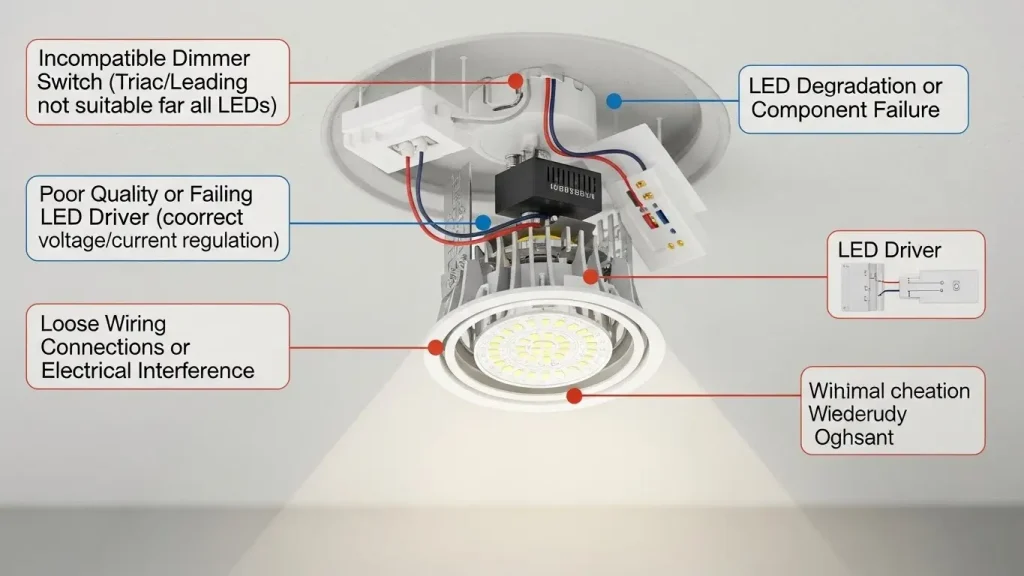
Dimmable LED downlights may flicker due to incompatible dimmers, unstable LED drivers, low-load issues, or wiring problems. The flicker usually appears at low brightness or during dimming because LEDs require stable current and compatible dimming systems such as Triac, 0–10V, or DALI-2.
1. Why Do Dimmable LED Downlights Flicker?
1.1 How Dimmable LED Downlights Actually Work
LEDs operate through semiconductor chips that respond instantly to electrical current changes. Because LEDs are extremely sensitive to current ripple, any instability in dimming systems can trigger visible flicker.
Common dimming methods include:
- Triac Leading-edge / Trailing-edge dimming
- 0–10V analog dimming
- DALI-2 digital dimming (See DALI Alliance)
- PWM-based smart dimming (Bluetooth, WiFi, Tuya)
LEDs flicker more easily than halogens because halogens dim through heat, while LEDs rely on precise electronic control.
1.2 Common Flickering Symptoms
- Micro flicker at steady brightness
- Flicker when dimmed below 20%
- Light level “pulsing” during dimming
- Light flashing but not fully turning on
- Inconsistent brightness across multiple fixtures
2. Common Causes of Flickering in LED Downlights
2.1 Incompatible Dimmer Switch (Most Common Issue)
Traditional halogen dimmers often:
- Require a higher minimum load
- Cannot provide smooth low-end dimming
- Cause strobing and shimmer
- Fail to recognize LED constant-current drivers
Modern LED downlights—like the XHLUX LED Spot Downlight Series—require LED-compatible trailing-edge dimmers for stable output.
2.2 Poor-Quality or Non-Dimmable LED Drivers
Issues include:
- Ripple current too high
- No smoothing capacitor
- Driver not supporting dimming
- Thermal instability causing intermittent flicker
Choosing high-quality LED drivers with PF ≥ 0.9, THD < 10%, and stable output significantly reduces flickering.
2.3 Voltage Fluctuations or Wiring Problems
Causes include:
- Old wiring
- Loose terminal connections
- Voltage drops in long cable runs
- Shared circuits with high-power appliances
Electrical inspection is required if multiple rooms show flickering simultaneously.
2.4 Mismatch Between Downlight & Dimming System
Examples:
- Lowest dimming level not matched
- Multiple brands mixed on one dimming circuit
- Total wattage too low for the dimmer to operate
- Using a Triac dimmer with 0–10V or DALI fixtures
For professional projects, XHLUX recommends using matched system solutions such as:
2.5 Insufficient Dimming Range
Many non-professional LEDs flicker when dimmed below 10–20%.
High-end commercial fixtures—such as those in the XHLUX Downlight Series—support 1%–100% deep dimming to avoid low-end instability.
3. Fast and Simple Troubleshooting Steps
3.1 Verify That the Downlight Is Actually Dimmable
Check product label:
- “Dimmable”
- Dimming protocol
- LED driver branding
Reliable fixtures (like XHLUX architectural downlights) clearly show dimming compatibility.
3.2 Identify the Dimmer Brand & Model
Questions to ask:
- Is it LED-compatible?
- Trailing-edge or leading-edge?
- Minimum load requirement?
- Does it match the LED driver type?
Leading-edge dimmers often cause flicker; trailing-edge provides smoother dimming.
3.3 Test Only One Downlight
If a single fixture works but multiple flicker:
- Dimmer cannot handle low load
- Wiring loop needs balancing
If the single fixture still flickers → driver issue.
3.4 Increase the Brightness
If flicker disappears above 20–30%:
- Dimmer curve mismatch
- LED driver minimum dimming threshold too high
3.5 Inspect the LED Driver
Check for:
- Overheating
- Loose connectors
- Burnt smell
- Ripple or hum during dimming
Faulty drivers should be replaced immediately.
4. Effective Solutions to Fix Flickering LED Downlights
4.1 Replace with LED-Compatible Trailing-Edge Dimmer
This solves 80% of flickering cases.
Recommended specs:
- Electronic low-voltage (ELV)
- Digital trailing-edge dimming
- Certified LED dimming curve
4.2 Upgrade to High-Quality, Low-Ripple LED Drivers
Look for:
- Constant-current
- Deep-dimming capability
- PF ≥ 0.9
- THD < 10%
XHLUX commercial downlights use industrial-grade drivers engineered for stability and uniform dimming.
4.3 Use Professional-Grade Dimming Systems
Commercial environments should use:
- DALI-2 dimming (most stable)
- 0–10V dimming
- Smart dimming (Tuya, BLE, Zigbee)
These systems eliminate flicker and ensure consistent performance across multiple fixtures.
4.4 Add Load or Adjust the Dimming Range
If total LED wattage is too low:
- Increase minimum dimming level
- Add dummy load (installers only)
4.5 Replace Poor-Quality LED Fixtures
Choose fixtures with:
- Deep-dimming drivers
- SDCM < 3 color consistency
- High-quality COB chips
- Smooth dimming curves
Explore premium downlight options in the XHLUX LED Spot Downlight Collection.
5. How to Prevent Flickering From the Start
5.1 Choose High-Quality Fixtures with Good Drivers
Downlights with robust drivers prevent most flickering issues.
XHLUX uses:
- Die-cast aluminum heat sinks
- PMMA optics
- Flicker-free drivers
- CRI > 90 / Ra97 options
5.2 Match Dimmers and LED Fixtures Before Installation
Confirm:
- Dimming type
- Minimum load
- Total load
- Compatibility list
5.3 Select the Right Dimming System for Each Space
| Space Type | Recommended Dimming |
|---|---|
| Living room / Dining | Triac trailing-edge |
| Office | 0–10V dimming |
| Commercial environments | DALI-2 smart control |
| Smart homes | WiFi / Bluetooth dimming |
5.4 Use Complete Matched System Solutions
Combining different brands creates incompatibilities.
XHLUX provides full lighting system solutions including:
6. When Should You Replace the Downlight or Dimmer?
Replace components when:
- Flicker persists after troubleshooting
- Driver overheats
- Dimmer is old (halogen-era models)
- Brightness drops significantly
- Burning smell or visible wiring damage
7. FAQ About Commercial Lighting Contractors
8. Final Summary
Three Laws of LED Flicker Diagnosis
- 80% = Dimmer Incompatibility
- 15% = Driver Quality Issues
- 5% = Wiring or Voltage Problems
Most Effective Fixes
- Install LED-compatible trailing-edge dimmer
- Replace poor-quality drivers
- Use deep-dimming LED downlights
- Consider commercial-grade systems like DALI-2
9. Want a Flicker-Free Dimming System?
XHLUX provides:
- Dimmable LED downlights
- 1%–100% deep-dimming drivers
- DALI / 0-10V compatible fixtures
- Complete lighting solutions for commercial projects
📩 Get a free lighting consultation:
👉 Contact XHLUX
📘 Browse product collections:
👉 LED Spot Downlights
👉 LED Track Lights
👉 LED Linear Lights
👉 Каталог продукции